> For clean Markdown of any page, append .md to the page URL.
> For a complete documentation index, see https://docs.getkard.com/2024-10-01/api/web-view/llms.txt.
> For AI client integration (Claude Code, Cursor, etc.), connect to the MCP server at https://docs.getkard.com/_mcp/server.
# WebView
This guide covers how to integrate the Kard Rewards WebView in your mobile or web application.
## Introduction
Kard's Rewards WebView provides a turnkey front-end offers experience, complete with a rewards map and intuitive offer discovery for their users. Issuers can integrate Kard's WebView seamlessly into their existing experiences allowing them to launch and iterate on their rewards program quickly and easily.
It is designed to be embedded in:
* **Mobile apps** via native WebView components (iOS WKWebView, Android WebView, React Native WebView)
* **Web applications** via iframe
## Environment URLs
| Environment | URL |
| ----------- | --------------------------------------------- |
| Test | `https://webview-test-us-east-1.getkard.com/` |
| Production | `https://webview-prod-us-east-1.getkard.com/` |
## Query Parameters
### **`token`** (required)
A JWT authentication token that identifies the user and organization.
**Required JWT claims:**
| Claim | Description |
| ----------- | ------------------- |
| `sub` | The user ID |
| `issuer_id` | The organization ID |
The token is used for API authentication when the WebView makes requests to Kard services.
### **`theme`** (optional)
A base64url-encoded JSON string containing design token overrides for customizing the appearance. Uses RFC4648 base64url encoding which is URL-safe (uses `-` instead of `+`, `_` instead of `/`, and omits padding). No `encodeURIComponent` is needed when using base64url encoding.
**Structure:**
```json
{
"theme": "system" | "light" | "dark",
"styles": {
"light": { /* design tokens for light mode */ },
"dark": { /* design tokens for dark mode */ },
"layout": { /* mode-independent tokens: radii and font weights */ }
},
"labels": {
"rewardsTitle": "Custom rewards page title",
"nearbyOffersTitle": "Custom nearby offers title",
"offersTitle": "Custom offers page title"
},
"layout": {
"showMap": true | false
},
"fontFamily": {
"source": "google" | "custom",
"family": "Font family name",
"url": "https://cdn.example.com/fonts.css",
"weights": ["400", "600"]
}
}
```
#### Color & theme tokens (styles.light / styles.dark)
These tokens are mode-dependent and can differ between light and dark themes:
| Token | Description |
| -------------------------- | ------------------------- |
| `background` | Page background color |
| `primary` | Primary brand color |
| `buttonPrimaryTextColor` | Text on primary buttons |
| `secondary` | Secondary color |
| `buttonSecondaryTextColor` | Text on secondary buttons |
| `textPrimary` | Primary text color |
| `textSecondary` | Secondary text color |
| `cardBackgroundColor` | Card background |
| `border` | Border color |
| `linkColor` | Link/button text color |
All color values must be valid CSS color values (hex, rgb, hsl, oklch, named colors, etc.).
#### Layout tokens (styles.layout)
These tokens are mode-independent and apply to both light and dark themes:
| Token | Description |
| ------------- | ------------------------------------------ |
| `radius` | Border radius (CSS length) |
| `chipRadius` | Filter chip border radius (CSS length) |
| `imageRadius` | Image container border radius (CSS length) |
| `cardRadius` | Card border radius (CSS length) |
#### Font weight tokens (styles.layout)
The WebView applies a named weight to each text role. These tokens are mode-independent and each value is a numeric weight string (`"100"` through `"900"`):
| Token | Default | Applies to |
| ------------------------ | ------- | -------------------------------------------------------- |
| `displayFontWeight` | `600` | Display and hero numbers (for example the rewards total) |
| `h1FontWeight` | `600` | Page titles |
| `h2FontWeight` | `600` | Section headings |
| `h3FontWeight` | `600` | Subheadings and page header titles |
| `bodyEmphasisFontWeight` | `600` | Emphasized body text |
| `bodyFontWeight` | `400` | Body text |
| `buttonFontWeight` | `500` | Button labels |
Only use weights your font actually loads. Setting `h1FontWeight` to `700` when `fontFamily.weights` is `["400", "600"]` leaves the browser to synthesize a fake bold, which usually looks worse than the real 600.
### `labels` (optional)
The `labels` property within the theme parameter allows customization of page titles displayed in the WebView. All label properties are optional — if not specified, the default values are used.
| Label | Default | Description |
| ------------------- | --------------- | ----------------------------------------- |
| `rewardsTitle` | `Rewards` | Title displayed on the rewards page |
| `nearbyOffersTitle` | `Nearby offers` | Title displayed on the nearby offers page |
| `offersTitle` | `Offers` | Title displayed on the offers page |
### `layout` (optional)
The `layout` property within the theme parameter controls the visibility of page sections. All layout properties are optional — if not specified, the default values are used.
| Property | Type | Default | Description |
| ------------------- | ------- | ------- | ---------------------------------------------------------------------------------------------------------------------------------------- |
| `showMap` | boolean | `true` | Show or hide the nearby offers map section on the rewards page |
| `showMapBackButton` | boolean | `true` | Show or hide the back arrow on the [Map](#map) page. Hide it when your container opens `/map` on its own and provides its own navigation |
### `fontFamily` (optional)
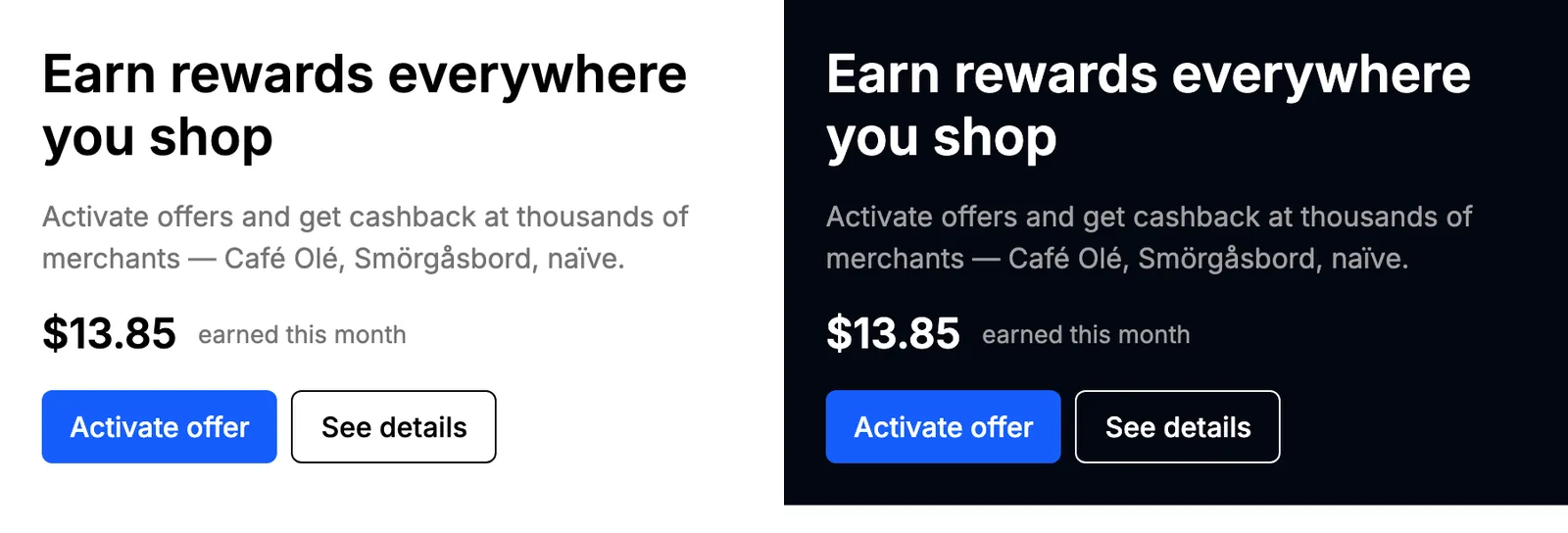
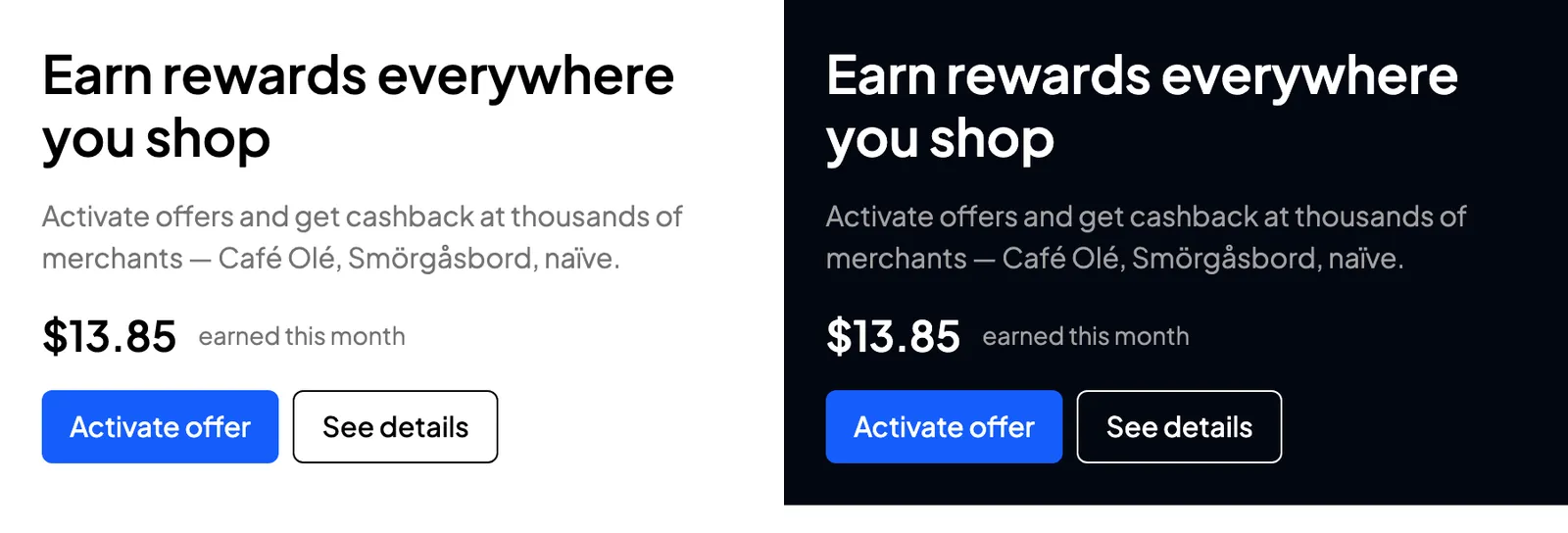
The `fontFamily` property within the theme parameter replaces the UI font. The WebView emits the font's `` tags while server-rendering the page and points its internal `--font-sans` variable at your family, so the first paint already uses your font, with no flash of the default one. Omitting `fontFamily` loads Inter.
The same UI on the default font, then with `fontFamily` set to `Plus Jakarta Sans`, each shown in light and dark:
| Field | Type | Required | Description |
| --------- | ------------------------ | ------------- | ------------------------------------------------------------------------------------------------------------------------------------------------------------------------------------------------------------------------------- |
| `source` | `"google"` \| `"custom"` | Yes | Where the font is loaded from |
| `family` | string | Yes | With `google`, a single Google Fonts family name such as `Open Sans` or `Source Sans 3` (no commas or quotes). With `custom`, either a single name or a full CSS stack such as `'Acme Sans', sans-serif`, with quotes balanced. |
| `url` | string | With `custom` | HTTPS URL of a CSS stylesheet that contains your `@font-face` rules |
| `weights` | string\[] | No | Weights to load, each a numeric string (`"100"` through `"900"`). Defaults to `["400", "500", "600", "700"]`. |
A Google font, loading only the weights the theme uses:
```json
{
"fontFamily": {
"source": "google",
"family": "Source Sans 3",
"weights": ["400", "600"]
}
}
```
A self-hosted font:
```json
{
"fontFamily": {
"source": "custom",
"family": "'Acme Sans', sans-serif",
"url": "https://cdn.example.com/fonts/acme.css"
}
}
```
> **Note**
>
> For `source: "custom"`, `url` must point at a **stylesheet**, not at a font file. The WebView loads it with ``, so a URL ending in `.woff`, `.woff2`, `.ttf`, `.otf`, or `.eot` is rejected. Serve a CSS file whose `@font-face` rules reference your font files, over HTTPS, readable cross-origin from the WebView's origin.
Whatever you configure, the WebView appends the platform sans-serif fallback stack behind it, so a font that fails to load falls back to the system UI font instead of blanking the page. To change the weight used for headings, body text, or buttons, set the font weight tokens in `styles.layout`, listed under the `theme` parameter above.
> **Warning**
>
> The `theme` parameter is validated as a single unit. One bad field discards **all** of the overrides in it and the WebView renders its defaults; overrides are never applied partially. `fontFamily` is the strictest part of the schema, so check these before shipping a theme: a comma or quote in a `google` family name, an `http://` URL, a `url` that points at a font binary, and a missing `url` on a `custom` font are all rejected.
## Standalone views
The root URL opens the full rewards experience. Every page inside it is also addressable on its own path, so a container can open one view directly: a push notification that lands on a single offer, a rewards tab that shows only the map, or a Kard placement carousel inside a screen you built yourself.
A standalone view is a path on the same base URL, and it reads the same query parameters as the root:
```
{baseUrl}/{path}?token={jwt}&theme={base64url}
```
`token` is required on every view. `theme` is optional and behaves exactly as it does at the root, so colors, radii, labels, and fonts carry over unchanged.
| View | Path |
| ------------------------------------------------- | ------------------------------------------ |
| [Offer details](#offer-details) | `/offers/{offerId}` |
| [Placement](#placement) | `/placements/{placementId}` |
| [Placement slot details](#placement-slot-details) | `/placements/{placementId}/slots/{slotId}` |
| [Rewards history](#rewards-history) | `/rewards-history` |
| [Map](#map) | `/map` |
Each view resolves its content for the user in the `token` and applies the same eligibility rules as the full experience. When the content is missing, expired, or not eligible for that user, the view renders a short unavailable message rather than an error page.
> **Note**
>
> Plan for dismissal in the host. A standalone view has no bottom navigation, and a deep link is usually the first entry in the WebView's history, so an in-page back control has nothing to pop. Give the user a native way out: a close button, a nav bar, or a sheet they can swipe away.
> **Warning**
>
> **Opening a detail view can activate its content.** When an offer or a batch slot carries an activation call-to-action, the WebView fires it as the page renders, without waiting for the user to press anything. Treat `/offers/{offerId}` and `/placements/{placementId}/slots/{slotId}` as actions rather than previews: don't prefetch them, and don't load them in a hidden WebView to warm a cache.
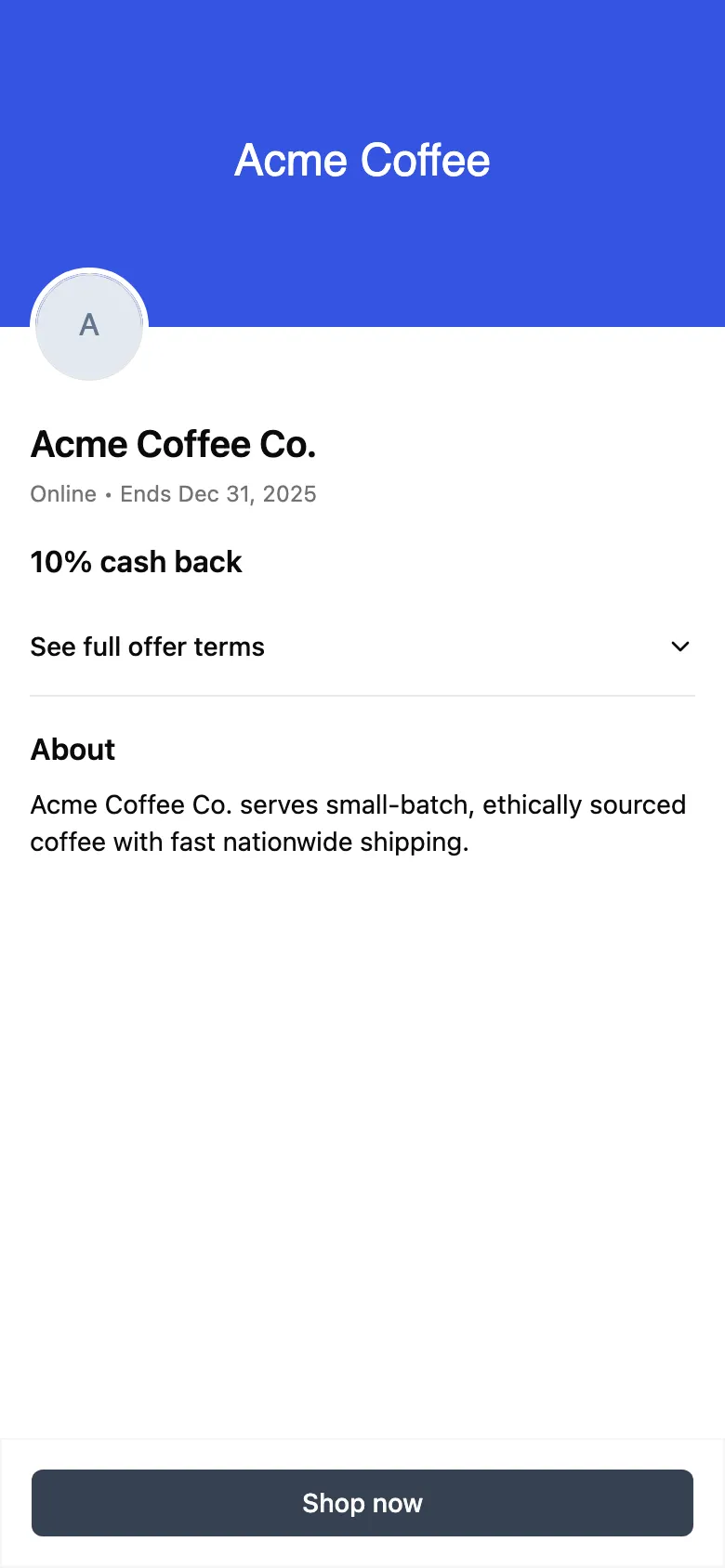
### Offer details
```
{baseUrl}/offers/{offerId}?token={jwt}&theme={base64url}&source={source}
```
A single offer's detail page. Deep link to it from push notifications, emails, SMS, or banners that promote one offer.
| Path / parameter | Description |
| ---------------- | --------------------------------------------------------------------------------------------------------------------------- |
| `{offerId}` | The ID of the offer to display |
| `token` | The same JWT as the root URL (required). The offer is fetched and eligibility-checked for this user. |
| `theme` | The same optional `theme` parameter as the root URL. |
| `source` | Optional attribution source describing how the user reached the page (see [Attribution source](#attribution-source) below). |
The page is server-rendered with the issuer's theme and no entrance animation, so it paints immediately with no loading flash.
> **Note**
>
> Eligibility is enforced per user — the offer only renders if it's available to the user identified by the `token`. If the offer is unavailable (for example, it has expired or the user isn't eligible), a graceful "offer not available" message is shown instead.
### Attribution source
When a cardholder opens the offer detail page, the WebView fires image impression pixels for the offer's assets. By default those impressions are attributed to in-app browsing (`BROWSE`). When you deep link straight to an offer from a campaign — an email, a push notification, a map pin, or search — add the optional **`source`** query parameter so the impression is attributed to how the user actually arrived:
```
{baseUrl}/offers/{offerId}?token={jwt}&source=EMAIL
```
The WebView normalizes the value (it is uppercased) and overrides the `medium` on each tracking image URL before the pixels fire.
| `source` value | Use when the user arrived from |
| -------------- | -------------------------------------------------------------- |
| `BROWSE` | Organic in-app browsing (the default when `source` is omitted) |
| `EMAIL` | A link in a partner/issuer email |
| `PUSH` | A push notification |
| `MAP` | A map pin or location-based surface |
| `SEARCH` | A search result |
> **Note**
>
> The `source` parameter is case-insensitive — `email`, `Email`, and `EMAIL` are equivalent. Any value outside the set above falls back to `BROWSE`. The parameter only affects attribution analytics; it does not change which offer is shown or whether it is eligible.
### Placement
```
{baseUrl}/placements/{placementId}?token={jwt}&theme={base64url}
```
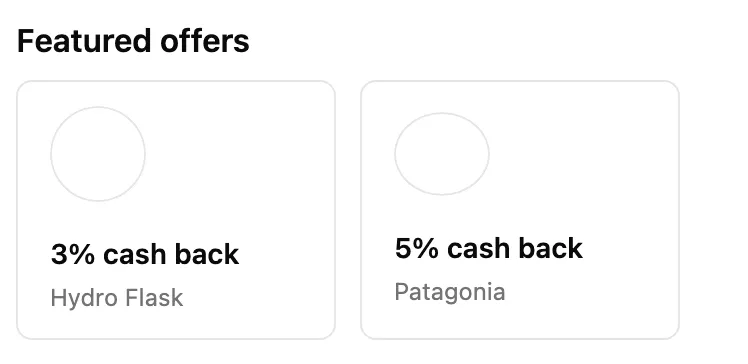
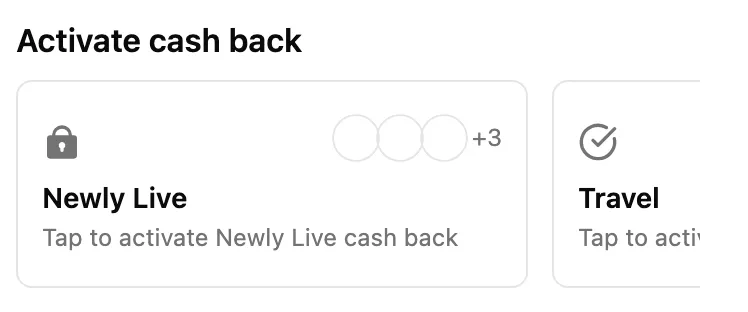
One placement's carousel and nothing else: no page header, no detail panel. Use it to place a Kard carousel inside a screen you own. The placement's display name becomes the section title, falling back to "Featured offers" or "Activate cash back" (as in the screenshots below) when that name hasn't resolved.
A placement holds one of two kinds of content, and the carousel follows whichever it returns.
**Standard offers.** One card per offer, each showing the merchant and its reward.
**Batch activation slots.** One card per slot, each standing for a bundle of offers the user turns on together.
#### Batch activation
A batch-activation placement groups offers into **slots**. A slot is a named bundle — "Travel", "Dining" — holding the offers that resolve for that user under the slot's content strategy. The user activates the bundle rather than each offer in it: activating a slot turns on every offer inside, and those offers then appear in the user's main offers list.
Each slot card carries a lock icon while the slot is waiting to be activated and a check once the user has an active activation, along with a cluster of the bundle's offer logos and a `+N` count for the ones that don't fit.
Activation runs on a cycle. The placement's `refreshInterval` (an ISO-8601 duration such as `P7D`) sets how long one lasts, so a slot's `expiresAt` is its `lastActivatedAt` plus that interval. Once it passes, the slot goes stale and the user activates it again to pick up the next set of offers. A slot that has expired but resolves to no offers stays active on purpose, so your UI never invites a user to refresh into an empty bundle. Slots on a **group** placement have no activation cycle at all — they stay active and act purely as a grouping.
#### Handling taps
Since this view has no detail panel, it hands taps back to you instead of navigating. On each tap the WebView posts a `PLACEMENT_ITEM_CLICKED` message through the same channel it uses for location (`window.KardWebview.postMessage`, or the iframe parent):
```json
{
"type": "PLACEMENT_ITEM_CLICKED",
"payload": {
"id": "the ID of the tapped offer or slot",
"type": "offer"
}
}
```
`payload.type` is `offer` for a standard offer and `placement` for a batch slot. Respond however you like: open your own screen, or load the [offer details](#offer-details) or [placement slot details](#placement-slot-details) view for that ID.
### Placement slot details
```
{baseUrl}/placements/{placementId}/slots/{slotId}?token={jwt}&theme={base64url}
```
The detail page for one [batch activation](#batch-activation) slot: the slot's name and artwork, the activation copy, and every offer in the bundle under an "Included offers" heading. Both IDs are required, since the slot is resolved inside the placement named in the path. Like offer details, the page is server-rendered, so the slot is already in the initial HTML.
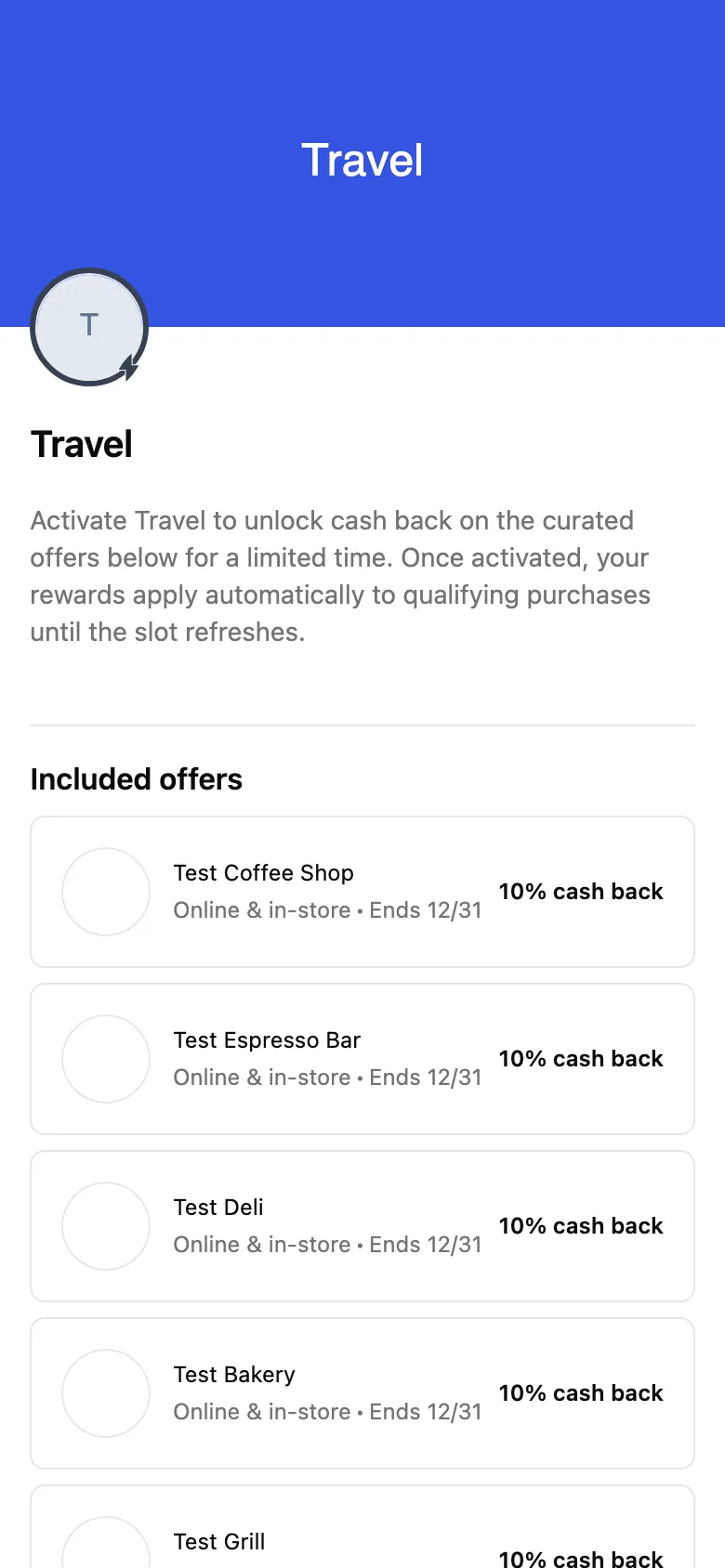
An unknown, expired, or ineligible slot renders an "Activation not available" message.
### Rewards history
```
{baseUrl}/rewards-history?token={jwt}&theme={base64url}
```
The user's earned cash back: a total, `12M` / `6M` / `3M` / `YTD` timeframe filters that rescope it, and the reward list split into pending and settled sections, grouped by month and paged as the user scrolls. There are no path parameters — the user comes from the `token`.
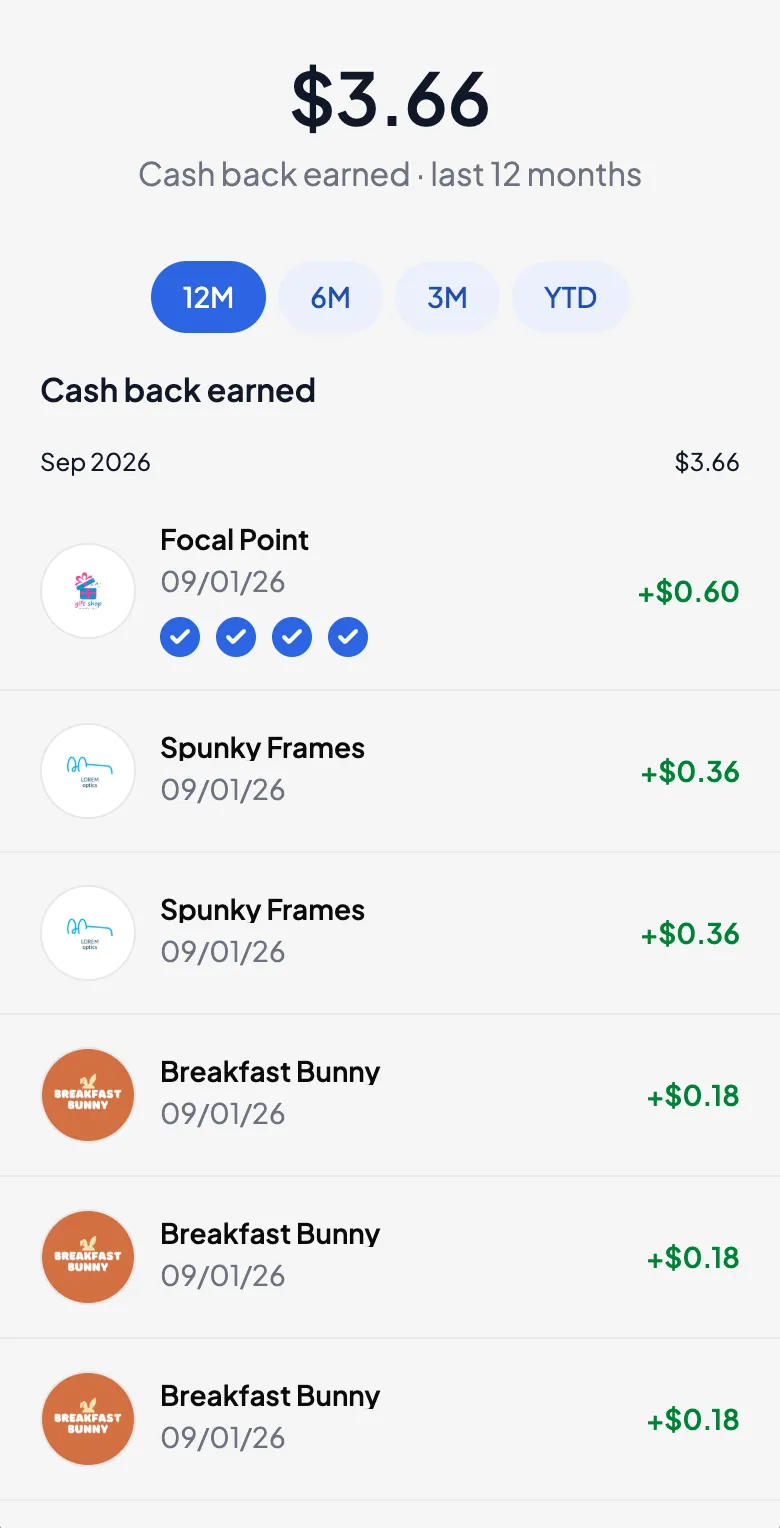
This view drops the back button that the in-app version shows, since the host owns dismissal on a deep link.
### Map
```
{baseUrl}/map?token={jwt}&theme={base64url}
```
The nearby offers map: a pin per offer location around the user, a list of the same offers sorted by distance, and a "Redo search in this area" control once the user pans away from where the results were fetched. Phone widths show one at a time with a header button to switch; at desktop widths the list and the map sit side by side.
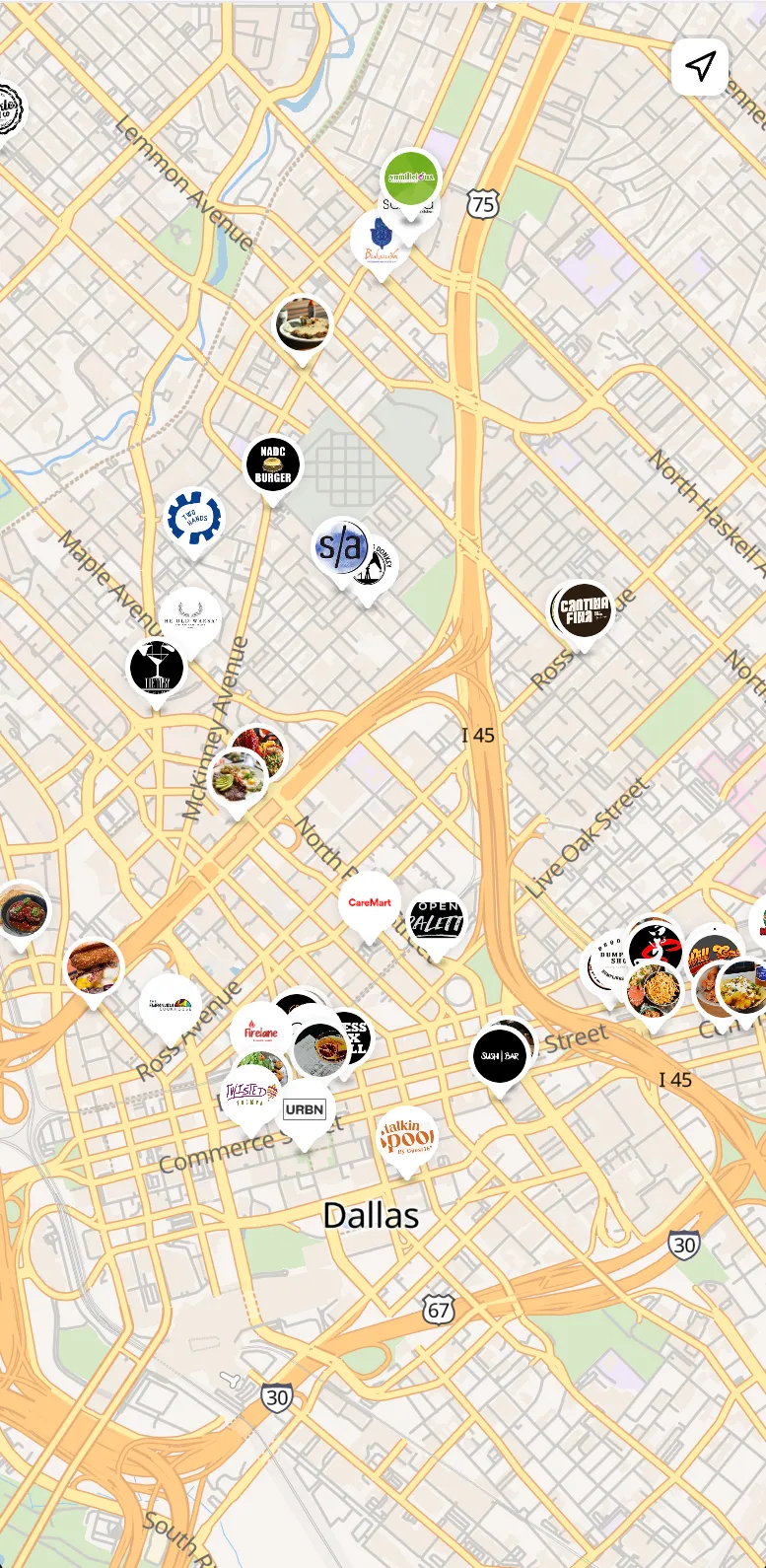
This is the only view that needs the location bridge. It asks the container for coordinates on load and stays in its loading state until it gets an answer, so the container must reply to every `REQUEST_LOCATION` (see [Location Message Passing Contract](#location-message-passing-contract)).
> **Note**
>
> Two behaviors specific to this view: its back arrow navigates to the root rewards experience with the query parameters preserved, so a user who opened `/map` directly can still reach the full experience from it. Set `layout.showMapBackButton` to `false` to hide it. And `layout.showMap` only controls the map section on the rewards page — it does not affect this route.
## Fetching a WebView JWT Token
The Kard SDK provides methods to generate WebView tokens. The SDK is available in multiple languages:
* [**TypeScript SDK**](/2024-10-01/sdks/typescript-sdk/getting-started)
* [**Python SDK**](/2024-10-01/sdks/python-sdk/getting-started)
**SDK Method:**
```javascript
users.auth.getWebViewToken(organizationId, userId)
```
This returns a signed JWT that should be passed as the `token` query parameter.
WebView tokens can also be generated via REST API. Refer to the API documentation for [Get WebView Token](/2024-10-01/api/auth/get-web-view-token).
## Location Message Passing Contract
The WebView uses a message-passing protocol to request location data from the container application. This is required for the rewards map feature to display nearby offers.
> **Warning**
>
> The WebView intentionally does **not** time out while waiting for location — this gives the user unlimited time to respond to the OS permission prompt. Because of that, the container **must always reply to every `REQUEST_LOCATION` with exactly one `LOCATION_RESPONSE` or `ERROR`** — including when permission is denied, location services are off, or the underlying request fails. If the container never replies, the rewards map stays in its "Finding offers near you…" loading state indefinitely.
### How the WebView selects a location source
When the map needs location, the WebView chooses a source in this order:
1. **`window.KardWebview.postMessage`** (or **`window.ReactNativeWebView.postMessage`**) — if present, the WebView sends `REQUEST_LOCATION` through it and waits for the container to post a response back. This is the path native containers use.
2. **iframe parent** — if the WebView is running inside an iframe (`window.self !== window.top`), it posts `REQUEST_LOCATION` to `window.parent`.
3. **`navigator.geolocation`** — otherwise it falls back to the browser's geolocation API.
> **Note**
>
> Native **iOS (WKWebView)** and **Android (WebView)** containers must expose a `window.KardWebview.postMessage` function — a small bridge injected at document start (shown in the examples below). A bare WKWebView / Android WebView does not provide it, and `navigator.geolocation` is unreliable inside native web views, so **without this bridge the WebView never asks the container for location and the map will not load.** (`window.ReactNativeWebView` is also accepted for backwards compatibility — `react-native-webview` injects it automatically, which is why the React Native example below doesn't add a bridge.)
### Message Types
| Type | Direction | Description |
| ------------------- | ------------------- | --------------------------------- |
| `REQUEST_LOCATION` | WebView → Container | WebView requests current location |
| `LOCATION_RESPONSE` | Container → WebView | Container sends location data |
| `ERROR` | Container → WebView | Container reports an error |
### Request Format (from WebView)
When the WebView needs location data, it sends:
```json
{
"type": "REQUEST_LOCATION"
}
```
### Success Response Format (to WebView)
When location is successfully retrieved:
```json
{
"type": "LOCATION_RESPONSE",
"payload": {
"ok": true,
"coords": {
"latitude": 40.7128,
"longitude": -74.0060,
"accuracy": 10,
"altitude": null,
"heading": null,
"speed": null
},
"timestamp": 1706380800000
}
}
```
**Coordinate fields:**
| Field | Type | Description |
| ----------- | -------------- | ---------------------- |
| `latitude` | number | Latitude in degrees |
| `longitude` | number | Longitude in degrees |
| `accuracy` | number \| null | Accuracy in meters |
| `altitude` | number \| null | Altitude in meters |
| `heading` | number \| null | Heading in degrees |
| `speed` | number \| null | Speed in meters/second |
### Error Response Format (to WebView)
When location cannot be retrieved:
```json
{
"type": "ERROR",
"payload": {
"ok": false,
"error": "Location permission not granted"
}
}
```
## Platform Integration Examples
#### React Native
```typescript
import { useCallback, useRef } from 'react';
import * as Location from 'expo-location';
import WebView, { ShouldStartLoadRequest } from 'react-native-webview';
const WEBVIEW_URL = 'https://webview-prod-us-east-1.getkard.com/';
const ALLOWED_ORIGIN = new URL(WEBVIEW_URL).origin;
interface RewardsWebViewProps {
token: string;
themeOverrides?: {
theme?: 'system' | 'light' | 'dark';
styles?: {
light?: Record;
dark?: Record;
layout?: Record;
};
labels?: {
rewardsTitle?: string;
nearbyOffersTitle?: string;
offersTitle?: string;
};
fontFamily?: {
source: 'google' | 'custom';
family: string;
url?: string;
weights?: Array;
};
};
}
// RFC4648 base64url encoding (URL-safe, no padding)
function encodeThemeOverrides(overrides: object): string {
return btoa(JSON.stringify(overrides))
.replace(/\+/g, '-')
.replace(/\//g, '_')
.replace(/=+$/, '');
}
export function RewardsWebView({ token, themeOverrides }: RewardsWebViewProps) {
const webviewRef = useRef(null);
const handleMessage = useCallback(async (event: any) => {
let msg: any;
try {
msg = JSON.parse(event?.nativeEvent?.data);
} catch {
return; // not a JSON message we handle
}
if (msg?.type !== 'REQUEST_LOCATION') return;
try {
// Request location permission
const { status } = await Location.requestForegroundPermissionsAsync();
if (status !== 'granted') {
webviewRef.current?.postMessage(JSON.stringify({
type: 'ERROR',
payload: { ok: false, error: 'Location permission not granted' }
}));
return;
}
// Get current position
const position = await Location.getCurrentPositionAsync({});
webviewRef.current?.postMessage(JSON.stringify({
type: 'LOCATION_RESPONSE',
payload: {
ok: true,
coords: {
latitude: position.coords.latitude,
longitude: position.coords.longitude,
accuracy: position.coords.accuracy,
altitude: position.coords.altitude,
heading: position.coords.heading,
speed: position.coords.speed,
},
timestamp: position.timestamp,
}
}));
} catch (error) {
// Always reply so the WebView's map doesn't wait forever.
webviewRef.current?.postMessage(JSON.stringify({
type: 'ERROR',
payload: { ok: false, error: error instanceof Error ? error.message : 'Failed to get location' }
}));
}
}, []);
// base64url is URL-safe, no encodeURIComponent needed for theme param
const themeParam = themeOverrides
? `&theme=${encodeThemeOverrides(themeOverrides)}`
: '';
const handleShouldStartLoadWithRequest = useCallback(
(request: ShouldStartLoadRequest) => {
try {
const url = new URL(request.url);
return url.origin === ALLOWED_ORIGIN;
} catch {
return false;
}
},
[],
);
return (
);
}
```
#### iOS (Swift)
```swift
import WebKit
import CoreLocation
class RewardsWebViewController: UIViewController {
private var webView: WKWebView!
private let locationManager = CLLocationManager()
private var pendingLocationRequest = false
private let webviewURL = "https://webview-prod-us-east-1.getkard.com/"
private let webviewOrigin = "https://webview-prod-us-east-1.getkard.com"
override func viewDidLoad() {
super.viewDidLoad()
locationManager.delegate = self
// Configure WebView with message handler
let config = WKWebViewConfiguration()
let contentController = WKUserContentController()
contentController.add(self, name: "nativeHandler")
config.userContentController = contentController
// The WebView routes location (and other native) messages through
// window.KardWebview.postMessage. A bare WKWebView doesn't provide
// it, so inject a shim at document start that forwards to our
// message handler.
let script = """
window.KardWebview = {
postMessage: function (message) {
window.webkit.messageHandlers.nativeHandler.postMessage(message);
}
};
"""
let userScript = WKUserScript(
source: script,
injectionTime: .atDocumentStart,
forMainFrameOnly: true
)
config.userContentController.addUserScript(userScript)
webView = WKWebView(frame: view.bounds, configuration: config)
// Match the background and make the WebView non-opaque so unpainted
// regions composite over your color instead of showing through as a
// transparent strip (an opaque WKWebView ignores backgroundColor). Use
// your theme's background color here — a dark value for the dark theme.
view.backgroundColor = .white
webView.isOpaque = false
webView.backgroundColor = .white
webView.scrollView.backgroundColor = .white
// Don't inset content for the safe area. Otherwise a full-height page
// (the map) becomes viewport + top inset + bottom inset tall and scrolls
// at the top and bottom; the page manages its own internal spacing.
webView.scrollView.contentInsetAdjustmentBehavior = .never
// Pin the WebView below the top safe area so the page's header and
// controls sit just under the Dynamic Island (the white view background
// fills the status-bar strip); full-bleed on the sides and bottom.
webView.translatesAutoresizingMaskIntoConstraints = false
view.addSubview(webView)
NSLayoutConstraint.activate([
webView.topAnchor.constraint(equalTo: view.safeAreaLayoutGuide.topAnchor),
webView.leadingAnchor.constraint(equalTo: view.leadingAnchor),
webView.trailingAnchor.constraint(equalTo: view.trailingAnchor),
webView.bottomAnchor.constraint(equalTo: view.bottomAnchor),
])
}
func load(token: String, themeOverrides: [String: Any]? = nil) {
var urlString = "\(webviewURL)?token=\(token.addingPercentEncoding(withAllowedCharacters: .urlQueryAllowed) ?? token)"
if let theme = themeOverrides,
let jsonData = try? JSONSerialization.data(withJSONObject: theme),
let jsonString = String(data: jsonData, encoding: .utf8) {
// RFC4648 base64url encoding (URL-safe, no escaping needed)
let base64Theme = Data(jsonString.utf8).base64EncodedString()
.replacingOccurrences(of: "+", with: "-")
.replacingOccurrences(of: "/", with: "_")
.trimmingCharacters(in: CharacterSet(charactersIn: "="))
urlString += "&theme=\(base64Theme)"
}
if let url = URL(string: urlString) {
webView.load(URLRequest(url: url))
}
}
private func sendLocationToWebView(_ location: CLLocation) {
let payload: [String: Any] = [
"type": "LOCATION_RESPONSE",
"payload": [
"ok": true,
"coords": [
"latitude": location.coordinate.latitude,
"longitude": location.coordinate.longitude,
"accuracy": location.horizontalAccuracy,
"altitude": location.altitude,
"heading": location.course >= 0 ? (location.course as Any) : (NSNull() as Any),
"speed": location.speed >= 0 ? (location.speed as Any) : (NSNull() as Any)
],
"timestamp": Int(location.timestamp.timeIntervalSince1970 * 1000)
]
]
sendMessageToWebView(payload)
}
private func sendErrorToWebView(_ error: String) {
let payload: [String: Any] = [
"type": "ERROR",
"payload": [
"ok": false,
"error": error
]
]
sendMessageToWebView(payload)
}
private func sendMessageToWebView(_ message: [String: Any]) {
guard let jsonData = try? JSONSerialization.data(withJSONObject: message),
let jsonString = String(data: jsonData, encoding: .utf8) else {
return
}
let script = "window.postMessage(\(jsonString), '\(webviewOrigin)');"
webView.evaluateJavaScript(script, completionHandler: nil)
}
}
// MARK: - WKScriptMessageHandler
extension RewardsWebViewController: WKScriptMessageHandler {
func userContentController(
_ userContentController: WKUserContentController,
didReceive message: WKScriptMessage
) {
// window.KardWebview.postMessage delivers a JSON string;
// tolerate a dictionary too in case the page sends one.
var type: String?
if let dict = message.body as? [String: Any] {
type = dict["type"] as? String
} else if let str = message.body as? String,
let data = str.data(using: .utf8),
let dict = (try? JSONSerialization.jsonObject(with: data)) as? [String: Any] {
type = dict["type"] as? String
}
guard type == "REQUEST_LOCATION" else { return }
// Authorization is asynchronous. If it isn't decided yet, ask and let
// locationManagerDidChangeAuthorization follow up once the user responds.
pendingLocationRequest = true
if locationManager.authorizationStatus == .notDetermined {
locationManager.requestWhenInUseAuthorization()
} else {
resolvePendingLocationRequest()
}
}
}
// MARK: - CLLocationManagerDelegate
extension RewardsWebViewController: CLLocationManagerDelegate {
// Request a one-shot location only once authorization is resolved, and
// always reply to the WebView when the user denies access.
private func resolvePendingLocationRequest() {
guard pendingLocationRequest else { return }
switch locationManager.authorizationStatus {
case .authorizedWhenInUse, .authorizedAlways:
locationManager.requestLocation()
case .denied, .restricted:
pendingLocationRequest = false
sendErrorToWebView("Location permission not granted")
case .notDetermined:
break // still waiting for the user's response to the prompt
@unknown default:
pendingLocationRequest = false
sendErrorToWebView("Location unavailable")
}
}
func locationManagerDidChangeAuthorization(_ manager: CLLocationManager) {
resolvePendingLocationRequest()
}
func locationManager(
_ manager: CLLocationManager,
didUpdateLocations locations: [CLLocation]
) {
guard pendingLocationRequest, let location = locations.last else { return }
pendingLocationRequest = false
sendLocationToWebView(location)
}
func locationManager(
_ manager: CLLocationManager,
didFailWithError error: Error
) {
guard pendingLocationRequest else { return }
pendingLocationRequest = false
sendErrorToWebView(error.localizedDescription)
}
}
```
#### Android (Kotlin)
**Gradle dependencies** (`app/build.gradle.kts`) — the example needs these beyond a default project:
```kotlin
dependencies {
implementation("androidx.webkit:webkit:1.16.0") // WebViewCompat / addDocumentStartJavaScript
implementation("com.google.android.gms:play-services-location:21.3.0") // FusedLocationProviderClient
implementation("androidx.core:core-ktx:1.19.0") // ContextCompat, ViewCompat, WindowInsetsCompat (often already present)
}
```
**Manifest permissions** (`AndroidManifest.xml`) — `INTERNET` is required for the page to load at all; the location permissions are needed for the rewards map:
```xml
```
```kotlin
import android.Manifest
import android.annotation.SuppressLint
import android.content.pm.PackageManager
import android.location.Location
import android.os.Bundle
import android.util.Base64
import android.webkit.JavascriptInterface
import android.webkit.WebView
import android.webkit.WebViewClient
import androidx.activity.ComponentActivity
import androidx.activity.result.contract.ActivityResultContracts
import androidx.core.content.ContextCompat
import androidx.core.view.ViewCompat
import androidx.core.view.WindowInsetsCompat
import androidx.webkit.WebViewCompat
import androidx.webkit.WebViewFeature
import com.google.android.gms.location.CurrentLocationRequest
import com.google.android.gms.location.FusedLocationProviderClient
import com.google.android.gms.location.LocationServices
import com.google.android.gms.location.Priority
import org.json.JSONObject
// ComponentActivity needs no AppCompat theme (avoiding a common runtime
// crash on Material/framework themes); this also compiles unchanged inside
// an AppCompatActivity if your app already uses one.
class RewardsWebViewActivity : ComponentActivity() {
private lateinit var webView: WebView
private lateinit var fusedLocationClient: FusedLocationProviderClient
private val webviewURL = "https://webview-prod-us-east-1.getkard.com/"
private val webviewOrigin = "https://webview-prod-us-east-1.getkard.com"
private val locationPermissionRequest = registerForActivityResult(
ActivityResultContracts.RequestMultiplePermissions()
) { permissions ->
when {
permissions[Manifest.permission.ACCESS_FINE_LOCATION] == true ||
permissions[Manifest.permission.ACCESS_COARSE_LOCATION] == true -> {
requestLocation()
}
else -> {
sendErrorToWebView("Location permission not granted")
}
}
}
override fun onCreate(savedInstanceState: Bundle?) {
super.onCreate(savedInstanceState)
fusedLocationClient = LocationServices.getFusedLocationProviderClient(this)
webView = WebView(this).apply {
settings.javaScriptEnabled = true
settings.domStorageEnabled = true
webViewClient = WebViewClient()
addJavascriptInterface(WebViewBridge(), "AndroidBridge")
}
setContentView(webView)
// On targetSdk 35+ the app is edge-to-edge by default, so the page
// would otherwise draw under the status bar. Pad the WebView by the
// system bar insets so the page's header sits just below them.
ViewCompat.setOnApplyWindowInsetsListener(webView) { view, insets ->
val bars = insets.getInsets(
WindowInsetsCompat.Type.systemBars() or WindowInsetsCompat.Type.displayCutout()
)
view.setPadding(bars.left, bars.top, bars.right, bars.bottom)
insets
}
// The WebView routes native messages through
// window.KardWebview.postMessage. Inject a shim at document start
// (before the page's own scripts) that forwards to our
// JavascriptInterface. Requires the androidx.webkit:webkit library and a
// System WebView new enough to support DOCUMENT_START_SCRIPT (the
// isFeatureSupported guard below). On older WebViews the feature is
// unavailable, so window.KardWebview is never defined and there is NO
// pre-load fallback — the rewards map cannot obtain location and will fail
// there. Keep the device's System WebView current (e.g. prompt to update
// Android System WebView / Chrome) to support those users.
if (WebViewFeature.isFeatureSupported(WebViewFeature.DOCUMENT_START_SCRIPT)) {
WebViewCompat.addDocumentStartJavaScript(
webView,
"""
window.KardWebview = {
postMessage: function (message) { AndroidBridge.postMessage(message); }
};
""".trimIndent(),
setOf(webviewOrigin)
)
}
// Provide the WebView JWT from your auth layer and load the page —
// here the token is passed in as an Intent extra.
intent.getStringExtra("token")?.let { load(it) }
}
fun load(token: String, themeOverrides: JSONObject? = null) {
var url = "$webviewURL?token=${java.net.URLEncoder.encode(token, "UTF-8")}"
themeOverrides?.let { theme ->
// RFC4648 base64url encoding (URL-safe, no escaping needed)
val base64Theme = Base64.encodeToString(
theme.toString().toByteArray(),
Base64.URL_SAFE or Base64.NO_WRAP or Base64.NO_PADDING
)
url += "&theme=$base64Theme"
}
webView.loadUrl(url)
}
@SuppressLint("MissingPermission")
private fun requestLocation() {
if (!hasLocationPermission()) {
locationPermissionRequest.launch(arrayOf(
Manifest.permission.ACCESS_FINE_LOCATION,
Manifest.permission.ACCESS_COARSE_LOCATION
))
return
}
// getCurrentLocation computes a fresh fix; lastLocation is often null.
val request = CurrentLocationRequest.Builder()
.setPriority(Priority.PRIORITY_HIGH_ACCURACY)
.build()
fusedLocationClient.getCurrentLocation(request, null)
.addOnSuccessListener { location ->
if (location != null) {
sendLocationToWebView(location)
} else {
sendErrorToWebView("Unable to get location")
}
}
.addOnFailureListener { e ->
sendErrorToWebView(e.message ?: "Location request failed")
}
}
private fun hasLocationPermission(): Boolean {
return ContextCompat.checkSelfPermission(
this, Manifest.permission.ACCESS_FINE_LOCATION
) == PackageManager.PERMISSION_GRANTED ||
ContextCompat.checkSelfPermission(
this, Manifest.permission.ACCESS_COARSE_LOCATION
) == PackageManager.PERMISSION_GRANTED
}
private fun sendLocationToWebView(location: Location) {
val payload = JSONObject().apply {
put("type", "LOCATION_RESPONSE")
put("payload", JSONObject().apply {
put("ok", true)
put("coords", JSONObject().apply {
put("latitude", location.latitude)
put("longitude", location.longitude)
put("accuracy", location.accuracy)
put("altitude", if (location.hasAltitude()) location.altitude else JSONObject.NULL)
put("heading", if (location.hasBearing()) location.bearing else JSONObject.NULL)
put("speed", if (location.hasSpeed()) location.speed else JSONObject.NULL)
})
put("timestamp", location.time)
})
}
runOnUiThread {
webView.evaluateJavascript(
"window.postMessage(${payload}, '$webviewOrigin');",
null
)
}
}
private fun sendErrorToWebView(error: String) {
val payload = JSONObject().apply {
put("type", "ERROR")
put("payload", JSONObject().apply {
put("ok", false)
put("error", error)
})
}
runOnUiThread {
webView.evaluateJavascript(
"window.postMessage(${payload}, '$webviewOrigin');",
null
)
}
}
inner class WebViewBridge {
// Receives the JSON string passed to window.KardWebview.postMessage.
@JavascriptInterface
fun postMessage(message: String) {
val type = try {
JSONObject(message).optString("type")
} catch (e: Exception) {
return
}
if (type == "REQUEST_LOCATION") {
// JavascriptInterface callbacks arrive on a binder thread.
runOnUiThread { requestLocation() }
}
}
}
}
```
> **Note**
>
> **Production considerations for this example:**
>
> **Google Play services** — `FusedLocationProviderClient` works on Google Play / `google_apis` emulator images and most phones, but fails silently on devices without GMS. Fall back to `android.location.LocationManager` for those.
>
> **Restrict navigation** — this example uses a bare `WebViewClient()`. In production, keep navigation on the Kard origin (parity with the iOS / React Native origin allowlists):
>
> ```kotlin
> webViewClient = object : WebViewClient() {
> override fun shouldOverrideUrlLoading(
> view: WebView, request: WebResourceRequest
> ): Boolean {
> // Block navigation away from the Kard origin.
> return request.url.host != "webview-prod-us-east-1.getkard.com"
> }
> }
> ```
>
> **Message parsing** — the `@JavascriptInterface` handler accepts only a `String`. That matches the contract (the page sends a JSON string), but unlike the iOS handler it will not tolerate a non-string argument.
#### Android (Jetpack Compose)
Same WebView, same bridge and location contract as the Android (Kotlin) tab — only the hosting changes. In a Compose app there is no `setContentView`, so the `WebView` is embedded with `AndroidView`, and permissions are requested with `rememberLauncherForActivityResult` instead of an Activity-level `registerForActivityResult`.
**Gradle dependencies** (`app/build.gradle.kts`) — the same dependencies as the Android (Kotlin) example, plus the Compose interop pieces (most Compose apps already have these):
```kotlin
dependencies {
implementation("androidx.webkit:webkit:1.16.0") // WebViewCompat / addDocumentStartJavaScript
implementation("com.google.android.gms:play-services-location:21.3.0") // FusedLocationProviderClient
implementation("androidx.core:core-ktx:1.19.0") // ContextCompat, ViewCompat, WindowInsetsCompat (often already present)
implementation("androidx.activity:activity-compose:1.10.1") // rememberLauncherForActivityResult (usually already present)
implementation("androidx.compose.ui:ui:1.9.0") // AndroidView (usually already present)
}
```
**Manifest permissions** (`AndroidManifest.xml`) — identical to the Android (Kotlin) example. `INTERNET` is required for the page to load at all; the location permissions are needed for the rewards map:
```xml
```
```kotlin
import android.Manifest
import android.annotation.SuppressLint
import android.content.pm.PackageManager
import android.location.Location
import android.net.Uri
import android.util.Base64
import android.webkit.JavascriptInterface
import android.webkit.WebResourceRequest
import android.webkit.WebView
import android.webkit.WebViewClient
import androidx.activity.compose.rememberLauncherForActivityResult
import androidx.activity.result.contract.ActivityResultContracts
import androidx.compose.runtime.Composable
import androidx.compose.runtime.mutableStateOf
import androidx.compose.runtime.remember
import androidx.compose.ui.Modifier
import androidx.compose.ui.platform.LocalContext
import androidx.compose.ui.viewinterop.AndroidView
import androidx.core.content.ContextCompat
import androidx.core.view.ViewCompat
import androidx.core.view.WindowInsetsCompat
import androidx.webkit.WebViewCompat
import androidx.webkit.WebViewFeature
import com.google.android.gms.location.CurrentLocationRequest
import com.google.android.gms.location.LocationServices
import com.google.android.gms.location.Priority
import org.json.JSONObject
private const val WEBVIEW_URL = "https://webview-prod-us-east-1.getkard.com/"
private const val WEBVIEW_ORIGIN = "https://webview-prod-us-east-1.getkard.com"
private const val WEBVIEW_HOST = "webview-prod-us-east-1.getkard.com"
// Receives the JSON string passed to window.KardWebview.postMessage and
// forwards REQUEST_LOCATION. JavascriptInterface callbacks arrive on a binder
// thread, so onRequestLocation re-posts to the main thread (see the factory).
private class WebViewBridge(private val onRequestLocation: () -> Unit) {
@JavascriptInterface
fun postMessage(message: String) {
val type = try {
JSONObject(message).optString("type")
} catch (e: Exception) {
return
}
if (type == "REQUEST_LOCATION") onRequestLocation()
}
}
private fun buildUrl(token: String, themeOverrides: JSONObject?): String {
var url = "$WEBVIEW_URL?token=${Uri.encode(token)}"
themeOverrides?.let { theme ->
// RFC4648 base64url encoding (URL-safe, no escaping needed)
val base64Theme = Base64.encodeToString(
theme.toString().toByteArray(),
Base64.URL_SAFE or Base64.NO_WRAP or Base64.NO_PADDING
)
url += "&theme=$base64Theme"
}
return url
}
// getCurrentLocation needs the permission check; suppressed because the
// callers (fetchLocation / the permission launcher) only run once a
// location permission has been granted.
@SuppressLint("MissingPermission")
@Composable
fun RewardsWebView(
token: String,
themeOverrides: JSONObject? = null,
modifier: Modifier = Modifier,
) {
val context = LocalContext.current
val fusedLocationClient = remember { LocationServices.getFusedLocationProviderClient(context) }
// Hold the WebView so the location/error callbacks can post messages
// back into the page after it has been created by the AndroidView factory.
val webViewRef = remember { mutableStateOf(null) }
fun sendMessageToWebView(payload: JSONObject) {
val webView = webViewRef.value ?: return
// evaluateJavascript must run on the main thread.
webView.post {
webView.evaluateJavascript(
"window.postMessage($payload, '$WEBVIEW_ORIGIN');",
null
)
}
}
fun sendLocationToWebView(location: Location) {
val payload = JSONObject().apply {
put("type", "LOCATION_RESPONSE")
put("payload", JSONObject().apply {
put("ok", true)
put("coords", JSONObject().apply {
put("latitude", location.latitude)
put("longitude", location.longitude)
put("accuracy", location.accuracy)
put("altitude", if (location.hasAltitude()) location.altitude else JSONObject.NULL)
put("heading", if (location.hasBearing()) location.bearing else JSONObject.NULL)
put("speed", if (location.hasSpeed()) location.speed else JSONObject.NULL)
})
put("timestamp", location.time)
})
}
sendMessageToWebView(payload)
}
fun sendErrorToWebView(error: String) {
val payload = JSONObject().apply {
put("type", "ERROR")
put("payload", JSONObject().apply {
put("ok", false)
put("error", error)
})
}
sendMessageToWebView(payload)
}
fun fetchLocation() {
// getCurrentLocation computes a fresh fix; lastLocation is often null.
val request = CurrentLocationRequest.Builder()
.setPriority(Priority.PRIORITY_HIGH_ACCURACY)
.build()
fusedLocationClient.getCurrentLocation(request, null)
.addOnSuccessListener { location ->
if (location != null) {
sendLocationToWebView(location)
} else {
sendErrorToWebView("Unable to get location")
}
}
.addOnFailureListener { e ->
sendErrorToWebView(e.message ?: "Location request failed")
}
}
// Always reply to the WebView so its map doesn't wait forever, including
// when the user denies the permission prompt.
val locationPermissionRequest = rememberLauncherForActivityResult(
ActivityResultContracts.RequestMultiplePermissions()
) { permissions ->
if (permissions[Manifest.permission.ACCESS_FINE_LOCATION] == true ||
permissions[Manifest.permission.ACCESS_COARSE_LOCATION] == true
) {
fetchLocation()
} else {
sendErrorToWebView("Location permission not granted")
}
}
fun hasLocationPermission(): Boolean {
return ContextCompat.checkSelfPermission(
context, Manifest.permission.ACCESS_FINE_LOCATION
) == PackageManager.PERMISSION_GRANTED ||
ContextCompat.checkSelfPermission(
context, Manifest.permission.ACCESS_COARSE_LOCATION
) == PackageManager.PERMISSION_GRANTED
}
fun requestLocation() {
if (hasLocationPermission()) {
fetchLocation()
} else {
locationPermissionRequest.launch(
arrayOf(
Manifest.permission.ACCESS_FINE_LOCATION,
Manifest.permission.ACCESS_COARSE_LOCATION
)
)
}
}
AndroidView(
modifier = modifier,
factory = { ctx ->
WebView(ctx).apply {
settings.javaScriptEnabled = true
settings.domStorageEnabled = true
// Keep navigation on the Kard origin (parity with the iOS /
// React Native origin allowlists).
webViewClient = object : WebViewClient() {
override fun shouldOverrideUrlLoading(
view: WebView, request: WebResourceRequest
): Boolean {
return request.url.host != WEBVIEW_HOST
}
}
addJavascriptInterface(
// JavascriptInterface callbacks arrive on a binder thread,
// so hop back to the WebView's (main) thread before touching
// permissions/UI.
WebViewBridge(onRequestLocation = { post { requestLocation() } }),
"AndroidBridge"
)
// On targetSdk 35+ the app is edge-to-edge by default, so the
// page would otherwise draw under the status bar. Pad the WebView
// by the system bar insets so the page's header sits just below
// them.
ViewCompat.setOnApplyWindowInsetsListener(this) { view, insets ->
val bars = insets.getInsets(
WindowInsetsCompat.Type.systemBars() or WindowInsetsCompat.Type.displayCutout()
)
view.setPadding(bars.left, bars.top, bars.right, bars.bottom)
insets
}
// The WebView routes native messages through
// window.KardWebview.postMessage. Inject a shim at document start
// (before the page's own scripts) that forwards to our
// JavascriptInterface. Requires the androidx.webkit:webkit library
// and a System WebView new enough to support DOCUMENT_START_SCRIPT
// (the isFeatureSupported guard below). On older WebViews the
// feature is unavailable, so window.KardWebview is never defined
// and there is NO pre-load fallback — the rewards map cannot
// obtain location and will fail there. Keep the device's System
// WebView current (e.g. prompt to update Android System WebView /
// Chrome) to support those users.
if (WebViewFeature.isFeatureSupported(WebViewFeature.DOCUMENT_START_SCRIPT)) {
WebViewCompat.addDocumentStartJavaScript(
this,
"""
window.KardWebview = {
postMessage: function (message) { AndroidBridge.postMessage(message); }
};
""".trimIndent(),
setOf(WEBVIEW_ORIGIN)
)
}
webViewRef.value = this
loadUrl(buildUrl(token, themeOverrides))
}
},
// Reload when the token or theme changes (e.g. on token refresh).
update = { webView ->
val url = buildUrl(token, themeOverrides)
if (webView.url != url) webView.loadUrl(url)
}
)
}
```
> **Note**
>
> **Production considerations for this example** are the same as the Android (Kotlin) tab:
>
> **Google Play services** — `FusedLocationProviderClient` works on Google Play / `google_apis` emulator images and most phones, but fails silently on devices without GMS. Fall back to `android.location.LocationManager` for those.
>
> **Message parsing** — the `@JavascriptInterface` handler accepts only a `String`. That matches the contract (the page sends a JSON string) but, unlike the iOS handler, it will not tolerate a non-string argument.
>
> **Reuse vs. duplication** — `WebViewBridge`, `buildUrl`, and the location/message helpers are identical to the View-based example; if you ship both, lift them into a shared file rather than copying.
#### Web (iframe)
```typescript
import { useEffect, useRef } from 'react';
const WEBVIEW_URL = 'https://webview-prod-us-east-1.getkard.com/';
const EXPECTED_ORIGIN = new URL(WEBVIEW_URL).origin;
interface ThemeOverrides {
theme?: 'system' | 'light' | 'dark';
styles?: {
light?: Record;
dark?: Record;
layout?: Record;
};
labels?: {
rewardsTitle?: string;
nearbyOffersTitle?: string;
offersTitle?: string;
};
fontFamily?: {
source: 'google' | 'custom';
family: string;
url?: string;
weights?: Array;
};
}
interface RewardsIFrameProps {
token: string;
themeOverrides?: ThemeOverrides;
}
// RFC4648 base64url encoding (URL-safe, no padding)
function encodeThemeOverrides(overrides: ThemeOverrides): string {
return btoa(JSON.stringify(overrides))
.replace(/\+/g, '-')
.replace(/\//g, '_')
.replace(/=+$/, '');
}
export function RewardsIFrame({ token, themeOverrides }: RewardsIFrameProps) {
const iframeRef = useRef(null);
useEffect(() => {
function handleMessage(event: MessageEvent) {
// Verify message origin and source match our iframe
if (
event.origin !== EXPECTED_ORIGIN ||
!iframeRef.current ||
event.source !== iframeRef.current.contentWindow
) {
return;
}
const msg = event.data;
if (msg?.type === 'REQUEST_LOCATION') {
navigator.geolocation.getCurrentPosition(
(position) => {
iframeRef.current?.contentWindow?.postMessage({
type: 'LOCATION_RESPONSE',
payload: {
ok: true,
coords: {
latitude: position.coords.latitude,
longitude: position.coords.longitude,
accuracy: position.coords.accuracy,
altitude: position.coords.altitude,
heading: position.coords.heading,
speed: position.coords.speed,
},
timestamp: position.timestamp,
}
}, EXPECTED_ORIGIN);
},
(error) => {
iframeRef.current?.contentWindow?.postMessage({
type: 'ERROR',
payload: {
ok: false,
error: error.message
}
}, EXPECTED_ORIGIN);
},
{ enableHighAccuracy: true }
);
}
}
window.addEventListener('message', handleMessage);
return () => window.removeEventListener('message', handleMessage);
}, []);
// base64url is URL-safe, no encodeURIComponent needed for theme param
const themeParam = themeOverrides
? `&theme=${encodeThemeOverrides(themeOverrides)}`
: '';
return (
);
}
```
## Theming Resources
Below is an example showing how to apply custom branding:
```typescript
// Define your brand colors
const themeOverrides = {
theme: 'light' as const,
styles: {
light: {
primary: '#0066cc',
buttonPrimaryTextColor: '#ffffff',
secondary: '#e0e0e0',
buttonSecondaryTextColor: '#1a1a1a',
background: '#f5f5f5',
textPrimary: '#1a1a1a',
textSecondary: '#6b7280',
cardBackgroundColor: '#ffffff',
border: '#e0e0e0',
linkColor: '#0066cc',
},
dark: {
primary: '#4da6ff',
buttonPrimaryTextColor: '#000000',
secondary: '#404040',
buttonSecondaryTextColor: '#f5f5f5',
background: '#1a1a1a',
textPrimary: '#f5f5f5',
textSecondary: '#a0a0a0',
cardBackgroundColor: '#2a2a2a',
border: '#404040',
linkColor: '#4da6ff',
},
layout: {
radius: '8px',
chipRadius: '9999px',
imageRadius: '9999px',
cardRadius: '12px',
h1FontWeight: '700',
bodyFontWeight: '400',
buttonFontWeight: '600',
}
},
labels: {
rewardsTitle: 'My Rewards',
nearbyOffersTitle: 'Deals near you',
offersTitle: 'All deals',
},
fontFamily: {
source: 'google' as const,
family: 'Source Sans 3',
weights: ['400', '600', '700'],
}
};
// RFC4648 base64url encoding (URL-safe, no padding)
function encodeThemeOverrides(overrides: object): string {
return btoa(JSON.stringify(overrides))
.replace(/\+/g, '-')
.replace(/\//g, '_')
.replace(/=+$/, '');
}
// base64url is URL-safe, no encodeURIComponent needed
const themeParam = encodeThemeOverrides(themeOverrides);
const url = `https://webview-prod-us-east-1.getkard.com/?token=${token}&theme=${themeParam}`;
```